Inventory & warehouse
Walk once. Scan every item. Print the label.
Pick lists follow your warehouse walk and tell pickers exactly which slot each unit goes in. The pack station checks every scan and books the parcel with Australia Post in the same click.
How pick, pack & ship works
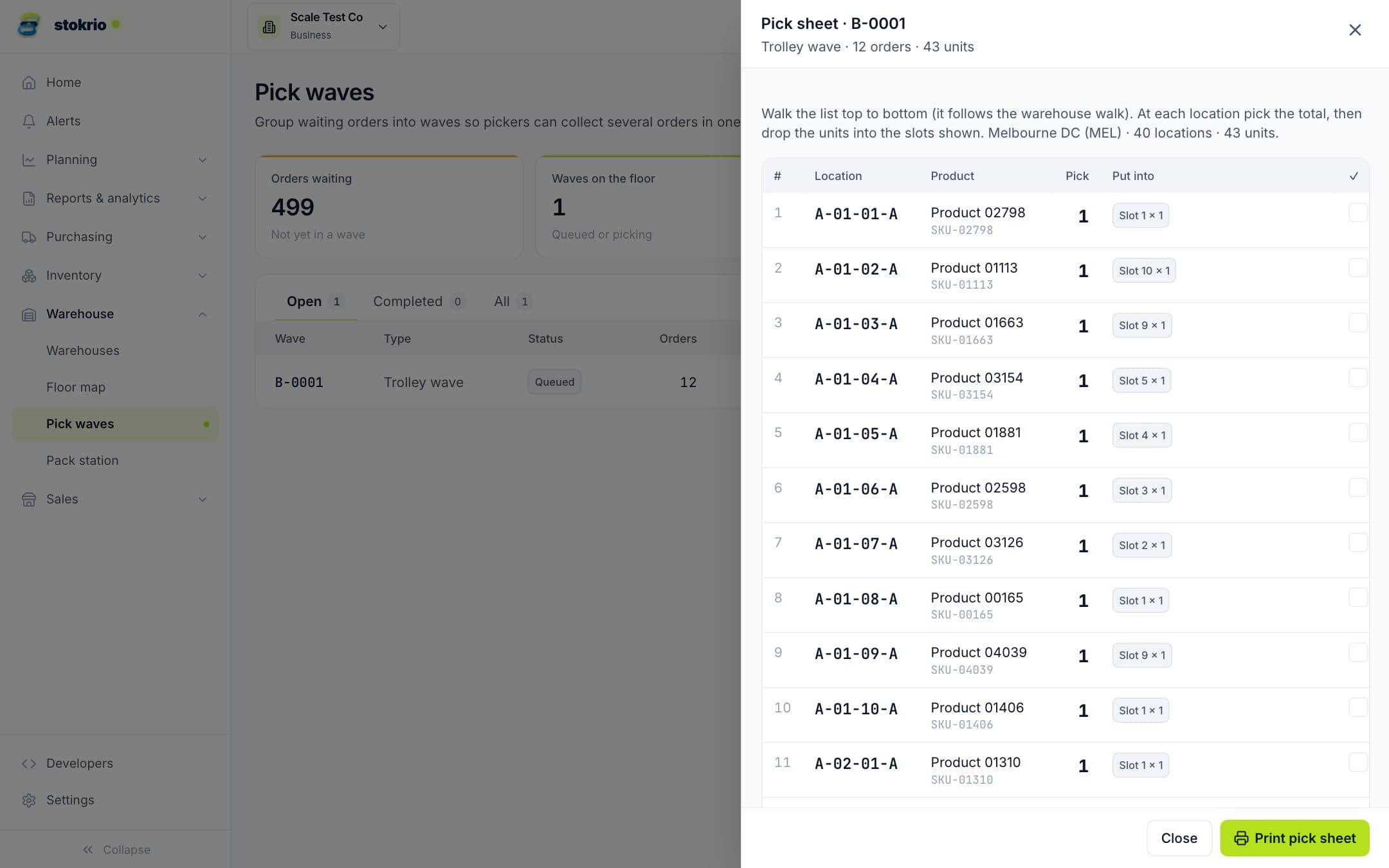
Stokrio groups open orders into pick waves (trolley waves of up to 24 orders, or singles). Each wave has a pick list: one line per product at its primary location, sorted by the warehouse's walking order, with the units from every order combined and split by trolley slot, storage-only stock flagged for replenishment and the earliest-expiring batch suggested. At the pack station every item is verified by barcode scan with audio feedback, then a box size and weight (estimated from product weights plus the empty box) are chosen and the parcel is booked with Australia Post, opening the PDF label for printing. Labelled parcels are lodged with Australia Post at the end of the day.
- Pick lists in walking order
- One line per location, in the order the picker walks, so nobody doubles back.
- Trolley slots
- Each line says how many units go in which slot (Slot 1 ×2 · Slot 4 ×1), with a printable slot checklist.
- Scan-to-pack
- Every item verified by barcode, with a chime for a match and a buzz for a wrong item or an over-pack.
- Box sizes and weight
- Choose from your saved boxes; weight is estimated from product weights plus the empty box, and you can correct it.
- Australia Post labels
- Book eParcel or StarTrack services and open the PDF label (A4 or 4×6 thermal); reprint or cancel any parcel.
- End-of-day lodgement
- Lodge the day's labelled parcels with Australia Post in one click.
Frequently asked questions
Which carriers are supported?
Do I need a scale?
What if a product has no location?
Works with
Warehouses, locations & transfers
Warehouses with Row-Bay-Height bin locations, a rack builder that marks each height as human or machine reach, barcode labels, products kept in many locations, transfers with in-transit status and reason-coded adjustments.
Learn moreLots, expiry & serial numbers
Record lot numbers, expiry dates and the location each batch was put away to when stock arrives, see what's expiring by warehouse and shelf, pick first-expired-first-out, and track serial numbers with warranty status.
Learn moreStock ledger & audit trail
Every change to stock on hand becomes a ledger line with its cause, reference, user and the balance after it, recorded by the database itself so nothing can change stock without leaving a trace.
Learn moreScreenshots use illustrative demo data, not customer results.
See Stokrio with your own data
Create a workspace in minutes. Connect Shopify or start with the API.